
I kept repeating one phrase to myself while juggling observability initiatives across Azure, on-prem systems, and stakeholder fire drills: “When everything is important, nothing is.” I knew I had to build a system to decide what actually mattered—or risk burning out delivering the wrong things fast.
That’s when I started combining two complementary tools: the Complexity vs. Effort Matrix and the Eisenhower Decision Matrix. Together they give a full picture—not just how hard something is, but whether it should be done at all right now. My team shifted from reactive firefighting to intentional delivery—and sprint planning debates that used to run 60+ minutes now close in under 20.
In this post I’ll walk through both tools, why neither one alone is enough, and the five-tier system I use every Monday to sort my backlog.
The Prioritization Gap (And What It Costs)
Most platform and engineering teams know what good prioritization looks like in theory. In practice:
- You spend days on a low-impact feature that no one uses
- A small config change that could’ve saved hours sits on page 3 of the backlog
- Sprint planning becomes a negotiation over urgency rather than a deliberate choice
The root cause isn’t laziness or bad intentions. It’s that urgency and importance feel the same in the moment—especially in on-call cultures where anything that pages feels critical. Without an external framework to separate them, every decision is a gut call.
The Complexity vs. Effort Matrix: Technical Lens
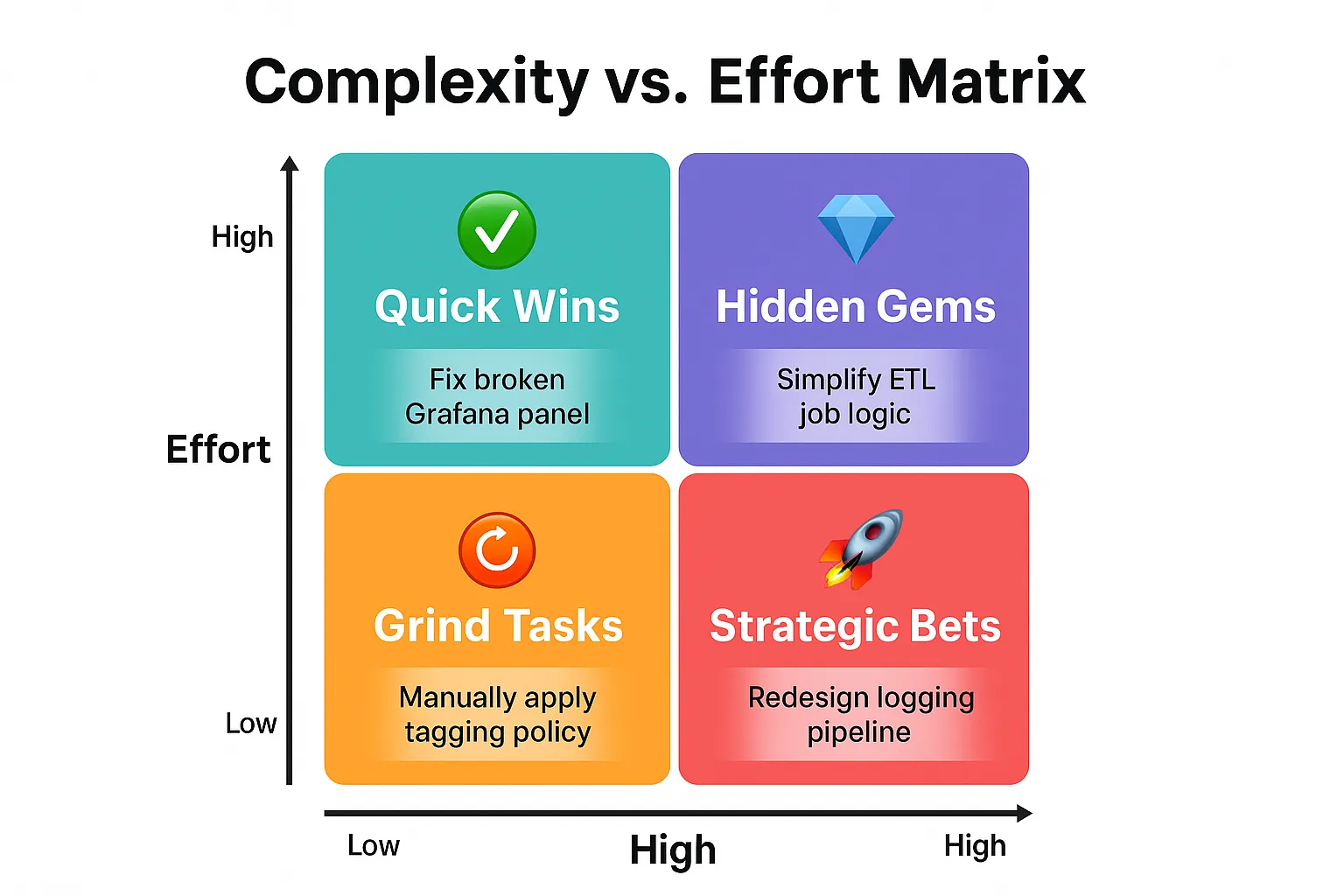
This matrix saved me when I had 17 tasks pending, each championed by a different team. I grabbed a whiteboard and plotted them—in fifteen minutes, the right next steps became obvious. Three tasks were Quick Wins we shipped the same week. Five Strategic Bets got scheduled with dedicated blocks. The remaining nine got delegated or dropped, freeing two engineers who had been stuck in grind work for nearly a month.
How It Works
- Effort: Time, energy, or resources required to complete the work
- Complexity: Technical difficulty, risk, or uncertainty involved
The Matrix
| ✨ Low Complexity | 🧠 High Complexity | |
|---|---|---|
| ⏱ Low Effort | ✅ Quick Wins — e.g. Fix broken alert rule, update runbook | 💎 Hidden Gems — High complexity, lower time cost: underestimated wins that compound. e.g. Tune Prometheus recording rules |
| ⚙ High Effort | 🔁 Grind Tasks — e.g. Apply IAM policies across 100+ resources | 🚀 Strategic Bets — e.g. Re-architect distributed tracing pipeline |
Pro Tip: Color-code tasks on your sprint board by quadrant. It makes trade-offs visible at a glance—especially useful when negotiating scope with stakeholders.
The Eisenhower Matrix: Strategic Lens
The Complexity/Effort Matrix tells you how hard something is. It doesn’t tell you whether it matters or when. That’s where the Eisenhower Matrix adds the missing dimension.
Two questions
- Urgent? → Does this have a near-term deadline or consequence if delayed?
- Important? → Does this meaningfully impact business outcomes or user experience?
| ⚡ Urgent | ⏳ Not Urgent | |
|---|---|---|
| ✨ Important | 🔥 Do Now — e.g. Fix active outage | 🧠 Plan & Invest — e.g. Design scalable log pipeline |
| ❌ Not Important | ⏳ Timebox — e.g. Cosmetic dashboard polish | 🪑 Avoid — e.g. Refactor code no one runs |
Why You Need Both
The Eisenhower Matrix alone can steer you toward urgent-but-shallow work. A “Do Now” task that takes two weeks of complex engineering may not actually be the right call—a quicker alternative might ship the same outcome in hours. Conversely, the Complexity/Effort Matrix alone has no notion of business impact: a “Quick Win” that’s low-effort and low-complexity is still waste if no one cares about the outcome.
Combining both matrices forces two questions simultaneously: “Does this matter, and when?” and “How much does this actually cost?” That overlap is where most prioritization mistakes happen.
The 5 Execution Tiers
Overlaying both matrices produces 16 combinations (4 effort/complexity cells × 4 urgency/importance cells). For practical day-to-day use, I collapse them into five tiers:
🔥 Tier 1 – Must-Do Now
- High urgency, high importance—regardless of complexity
- e.g. Patch active production incident, restart failing data pipeline
- Action: Start immediately. Resist context-switching away.
- Constraint: Cap at one or two per day. If more than two items qualify, something is being mis-categorized or stakeholder pressure is inflating urgency—push back and re-classify.
✅ Tier 2 – Strategic Leverage
- High importance, investment-worthy effort or complexity
- e.g. Redesign log ingestion pipeline, implement trace exemplars, SLO baseline rollout
- Action: Break into deliverables. Schedule focused time—don’t let Tier 1 fires permanently crowd these out.
🛠 Tier 3 – Delegate or Automate
- Important, but execution is high-volume and low-complexity—grind work that burns engineers if it stays undelegated
- e.g. Apply bulk IAM policies, tag 100+ cloud resources, update alert routing config
- Action: Script it, delegate it, or batch it into a low-interruption block.
⏳ Tier 4 – Timebox or Defer
- Low importance, non-blocking
- e.g. Rename a dashboard panel, tweak CLI output style, minor UX polish
- Action: Timebox to prevent scope creep. Revisit during retrospectives.
🪑 Tier 5 – Eliminate
- No urgency, no measurable value
- e.g. Rewrite a script no one runs, rebuild a feature with zero users
- Action: Remove from the backlog without guilt.
Optimization by Tier
| Tier | Priority Level | Strategy |
|---|---|---|
| Tier 1 | ✅ Critical | Start your day here. One or two max—protect the rest of your day. |
| Tier 2 | 💡 High | Allocate 30–50% of weekly capacity here. This is where leverage compounds. |
| Tier 3 | 🛠 Medium | Batch, delegate, or automate. Don’t let grind crowd out strategy. |
| Tier 4 | ⚠ Low | Review at sprint retro. Two sprints at Tier 4 and it’s Tier 5. |
| Tier 5 | ❌ None | Prune regularly. A clean backlog is a forcing function for focus. |
My Personal Workflow: How I Apply This Weekly
Every Monday, I:
- Review all open backlog items
- Tag each by effort and complexity (two minutes per task)
- Classify urgency and importance with stakeholders during a 30-minute sync (this holds only when someone in the room has authority to say no — without that, classification becomes negotiation)
- Apply the five-tier filter and re-sort the board
- Share the priority map before the team standup
The biggest shift wasn’t speed—it was that junior engineers could now see why certain tasks sat in the backlog. That visibility cut planning debates from 60+ minutes to under 20, and made it easier to hand off Tier 3 work with confidence.
Conclusion: Clarity Over Chaos
These two frameworks in combination aren’t about moving faster. They’re about making sure the work that moves the needle gets to the top—consistently, visibly, and without a weekly argument over urgency.
Whether you’re scaling an observability platform, running an on-call rotation, or planning a multi-cluster Kubernetes rollout—prioritization is your highest-leverage engineering skill.
The 4×4 template below is where to start. Fifteen minutes on Monday, consistent every week.
✅ 4x4 Prioritization Matrix Template
Each cell maps your task’s effort/complexity cost (columns) against its urgency/importance context (rows). Use this in Notion, Miro, or any sprint board.
| Importance + Urgency ↓ / Effort + Complexity → | ✅ Low Effort · Low Complexity | 🔁 High Effort · Low Complexity | 💎 Low Effort · High Complexity | 🚀 High Effort · High Complexity |
|---|---|---|---|---|
| 🟢 Important + Urgent | ✅ Tier 1: Do Now — Quick Win — e.g. Fix broken alert rule | ✅ Tier 1: Do Now — Accept the grind — e.g. Bulk-remediate failing health checks | ✅ Tier 1: Do Now — Move fast — e.g. Hotfix runaway Prometheus query | ✅ Tier 1: Do Now — All hands — e.g. Patch core service under SLA breach |
| 🟡 Important + Not Urgent | 💡 Tier 2: Plan Soon — Quick Win — e.g. Add exemplars to existing metrics | 🛠 Tier 3: Delegate or Schedule — e.g. Apply IAM policies across 50 resources | 💡 Tier 2: Investigate — Hidden Gem — e.g. Tune Loki label cardinality | 💡 Tier 2: Deep Work — Strategic Bet — e.g. Observability platform redesign |
| 🔴 Not Important + Urgent | ⚠️ Tier 4: Timebox — e.g. Rename a dashboard panel | ⚠️ Tier 4: Timebox — e.g. Bulk config formatting update | ⚠️ Tier 4: Question the urgency — e.g. Minor CLI behavior fix | ⚠️ Tier 4: Drop or defer — e.g. Refactor low-traffic internal tool |
| ⚫ Not Important + Not Urgent | ⚠️ Tier 4: Nice-to-Have — e.g. Cosmetic dashboard tweaks | 🧹 Tier 5: Eliminate — e.g. Cleanup unused log formatters | 🧹 Tier 5: Skip — e.g. Rewrite CLI for unused legacy script | 🧹 Tier 5: Eliminate Immediately — e.g. Rebuild feature with zero users |
📌 Usage Instructions
- Color-code in your task manager:
- Tier 1: ✅ Green
- Tier 2: 💡 Blue
- Tier 3: 🛠 Yellow
- Tier 4: ⚠️ Orange
- Tier 5: 🧹 Grey / ❌ Red
- Filter weekly using this template—15 minutes on Monday prevents hours of misalignment by Friday.
- Visualize in a 4×4 grid for team syncs or retrospectives.
Related posts
The Self-Silencing Anti-Pattern: Why Your Observability Stack Goes Blind When You Need It Most
May 25, 2026
The Productivity Trap Nobody Talks About: When "Productive" Work Becomes Procrastination
Jul 6, 2026
Unbounded Cardinality, Zero Alerts, and 14-Second Dashboard Loads: The Structural Limits of the Grafana Azure Monitor Plugin
Jun 10, 2026
Older
How Alloy's Default max_shards Turned a Mimir Blip Into a Production Monitoring Blackout
Newer
Agent Memory as Infrastructure: The Context Injection Pattern That Replaces Fine-Tuning
Discussion